Showing posts with label iPad Accessories. Show all posts

Friday, January 06, 2012

A Pearl of Great Worth


I've been using the BookBook case for my iPad 2 and it's been fine, for the most part.  However, it does have a few clunky features that the Commander has found annoying and I've had to agree with him.  So, in an effort to find a workable compromise, I went back to the drawing board (re: Amazon) and started searching again for another case.  What I decided on was the iPearl Folia Cover Case with a built-in stand and handstrap.  You can see the details here on Amazon.  I even found it in a lovely spring green color that I love.


It arrived today and I wasted no time putting my iPad 2 into it.  That was very straightforward.  On the one side that isn't attached to the back cover, you just unfold the flap and slide in your tablet and then fold the flap back under the iPad.  There is a cut-out on the back for the camera and all the buttons are easily accessible.  The cover is designed in such a way that it automatically puts your iPad to sleep when you close the cover and wakes it up when you open it back up.


On the left inside cover are two features. The one on the right is the handstrap, which I'll discuss later in this post.  The one on the left is the flap that opens for propping it into a position for typing.  You can't see it in this picture but the flap has clear plastic on the front of it that is separated into two sections that are the right size for business cards (or, as one reviewer up on Amazon mentioned) credit cards).


This is how the flap looks when it is raised up.  It can only be opened so far because it is secured with a ribbon strap.


The picture above shows the case set up in the "typing mode."  I gave it a quick try in one of my apps that uses a lot of typing and at first, I found myself making a lot of mistakes because I found the edge of the case getting in my way.  However, once I rested my wrists on the table surface (which was easy to do given the height and angle of the case), I easily was able to accurately type.  Usually I would NOT type this way as it is ergonomically incorrect for long term typing but hey, I don't know many people who do production typing on an iPad.  I think for normal tablet typing, you'll be fine unless you REALLY have a problem with carpel tunnel syndrome.


There is another tab on the back of the case that can be utilized to put your tablet into a position for reading horizontally.  You fold the cover over and slip it under the little tab.  The cover has a bendable spot that folds it at just the right place to do this.
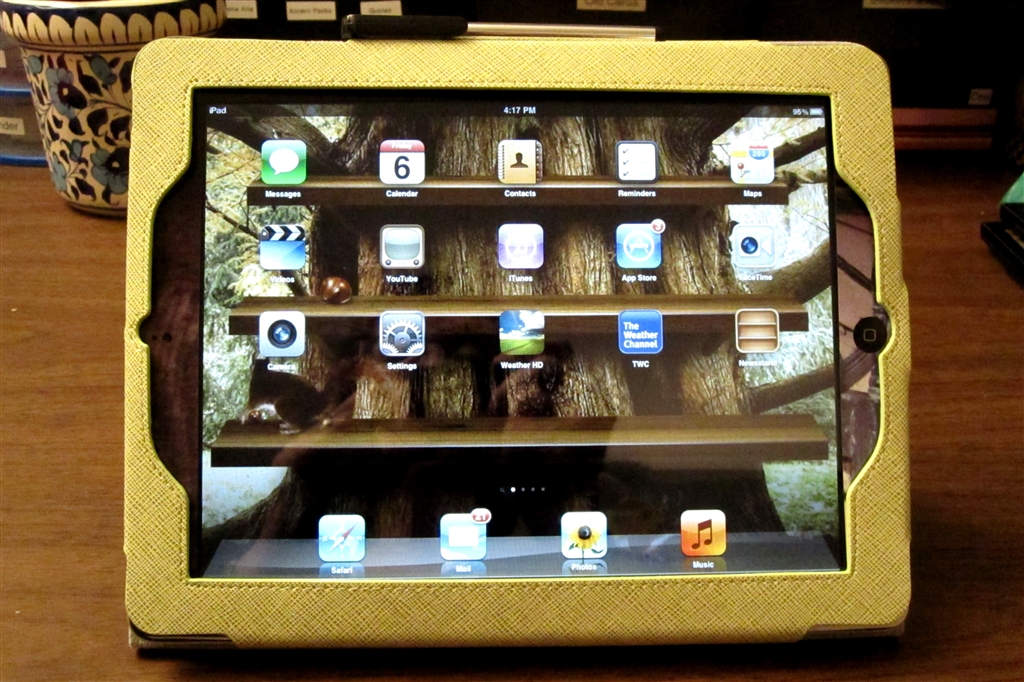

Here is my iPad looking at it from the front when it is set up in the reading position.  It's really at a nice level for reading on a table, leaving your hands free to swipe, point, touch, or whatever.  For that matter, you can also easily play games in this position, too, if you prefer.

Now if you want to use your iPad in a vertical position, there isn't a hinge that allows you to place it into a "hands-free" position.  You still have to hold it but that's where the handstrap comes into play.  You just fold the left side of the cover back, slip your hand under the elasticized handstrap and you can hold it easily.

A few other features:  There is an elastic band that you can slip over the cover to hold it shut when you aren't using the iPad.  The cover is leather, according to the manufacturer, although you couldn't prove it by me.  It doesn't smell like leather to me (I'm a saddle kind of girl) but I'll take their word for it.  The inside is a nice soft gray suede fabric.  The cover comes with a touch screen stylus pen that slips into a handy little loop on the side of the case.   I used the pen (which isn't actually a pen but rather a pointer-like device with a foam end) and it worked great on the surface of the iPad.


Best of all, the iPearl Cover Case is a very reasonable price.  I paid $17.99 for my case.  That's a bargain in my book.

Wednesday, October 26, 2011

Disguised as a Book

BookBook Case for iPad
Wow, this company ships quickly!  I ordered my BookBook cases on the 24th of October and they arrived today, the 26th of October.  Talk about a pleasant surprise.  Let's take a look at the iPad case, shall we?

Here is what the case looks like before you put the iPad inside it.  There is a leather thong-type strap that hooks around a leather circle.  There is an elastic strap on the top of the side where your iPad goes as well as two leather tabs on the bottom that the iPad slides into.  The inside is a nice soft suede that provides a non-scratch surface that won't damage your iPad screen.

Here is how it looks with my iPad inside the case.  I had to take my Smart Cover off the iPad but all that means is that I have to put it to sleep myself now and not expect it to go to sleep automatically like it used to when I'd close the cover.

BookBook case set up as Stand
When you want to use this case as a stand, you slip the top of your iPad out of the elastic and take the leather strap out from behind the iPad.  It sounds fussy but indeed, it is a very quick operation.  Now you put your iPad back under the elastic and then fold your case open, taking the leather strap around, under, and back to the little circle thing (sorry, I don't know what the official name for it is), and then adjust the angle you want for the stand before wrapping the strap several times around the circle to secure your stand.

iPad in Upright Stand Position
 Reverse the procedure when you are finished using your iPad in the "stand" postition.  When you aren't using it with the "no-hands" approach, you can just hold it like you would a book on your lap and it will stay open while you manipulate your screen as normal.

 BookBook case Spine
Put your iPad in sleep mode or turn it off when you're done using it and zip up your case and this is the end result.  It looks just like a book.  How cool!

BookBook iPhone case 
I also got my case for my new iPhone 4s (which still hasn't arrived).  I wanted to show you how the two cases compare in size.  If you've ever seen a pocket-size New Testament, my new iPhone case is about the same size.

Waiting for my new phone
Now I just have to get my new phone and then I'll take out the "dummy" filler and slip that baby in my new case and put a few credit cards and my driver's license on the other side and I'm good to go.  Oh, guess I'd better slip a twenty in there as well, in case I get hungry for a snack.

Tuesday, October 25, 2011

Device Cases for Booklovers

If you've been reading my blog, then you know that I LOVE to read.  Books have been some of my favorite things since I was just a kid.  In the past few years, I've changed the way I like to read books, preferring now to read them electronically on either my Kindle or on my Nook.  Still, it's nice to give the appearance of a book and with that in mind, I've found some covers for the technical gadgets in your life that will show others that you are a fellow booklover.

1.  Zazzle has a wide variety of iphone cases for booklovers.  Check out the selection at this link.
http://www.zazzle.com/for+book+lovers+iphone+cases

2.   This vendor has got to be one of my current favorites. BookBook makes covers for iPhone, iPad, MacBook, and MacBook Air. Right now I have a cover on order for my iPhone 4s and my iPad and when they arrive (well, and when my iPhone arrives), I'll be sure to post a review of these covers for you up here on the blog.


3.  DodoCase covers can be simple or more elaborate like this Fantastic Flying Books of Morris Lessmore Case for iPad:


4.  Gelaskins offers covers for Kindles and Nooks like this one designed by Colin Thompson.  You can also submit your own photo which they can make into a custom skin for you and they do a great job.


Nedrelow - offers simple traditional book covers that you can personalize with your own custom texts or purchase with text the company offers.


So what are you waiting for?  Go check these companies and their products out and see how you can advertise your love of reading.