Tuesday, November 22, 2011

Smile for the Birdie!


Ah, Thanksgiving!  That time of year when families travel from near and far to get together to eat too much, shop too much, act like fools, and make wonderful memories.


 In our family, my brother's family and our family have taken turns for years getting together to spend the long weekend together.  We've had certain "traditions" that we've followed over the Thanksgiving holiday which I'll share with you in the next few posts but one of the most sacrosanct has been posing for family pictures.


At some point in the weekend, we all get into our festive outfits and gather in one central location, set up the cameras on the tripods, and then the fun begins.


We take many different combinations of pictures.....photos of each family, photos of just the kids, photos of the adult siblings, and photos of the siblings with our mom.


These photo sessions can drag on  and on, sometimes erupting into gales of laughter and other times deteriorating into testiness.


The one thing that they all have in common, though, is that they are snapshots of times in our lives that will never come again.  Despite the dorkiness of them or their perfection, they will always remind us of the special joy we have shared as family.


They are treasures that I enjoy looking at every year.


Perhaps my all-time favorite is this picture that was taken the Thanksgiving immediately after I had finished my 6 months of chemotherapy after a diagnosis of breast cancer.  The joy reflected on our faces is so evident.  We were a family united together, alive,  and life was good.  It still is!  May you all have a wonderful Thanksgiving this week (or have HAD one - for my Canadian friends).

Thursday, November 17, 2011

Case in Point


Today was the beginning of the big Christmas sewing push.  In other words, I spent the morning ironing all the fabric for the novelty pillowcases that I always "gift" to my extended family and then cutting out the various components.  Tomorrow my friend is coming over with her sewing machine and I'll have my machine set up and we'll spend the day doing our Christmas sewing.  I plan to have all my pillowcases finished by tomorrow evening.  That's the plan!

In case you're wondering what pattern I follow, I use one from an organization called Pillows of Love.  They help women and children in crisis.  Some years back, our church's women's ministry group made a bunch of pillowcases for this group and I kept the pattern and have been using it ever since.  Here is a link to the pattern, which is available for free.  If you go to their website to check it out, read about their work.  They are a great organization.


In the meantime, my new case for my Kindle Fire arrived today.  It is a leather cover made by Marware.  You can read all the particulars on Amazon's site here.  When I first opened it up and tried to put the Fire into it, I really struggled to get it into the corner grippers.  I finally manhandled it into it and it's securely in there.  Of course, after I had put all that effort into it, I discovered the simple instructions (pictures only) which had fallen out of the box when I opened it and slid to the side that showed you had to SLIDE the one side into the right-hand top and bottom grips and then press the other side down into the grips.  Oh, boy!

The case is kept closed by an elastic strap that goes over the front of the case.  When the case is open, it looks like this.  At first I thought, "What in the world is with that left side of the case?"  OK, so I looked at the instructions again.  The honeycombed strips come into play when you use the case as a stand for the Fire.  The instructions never mentioned (or showed) what the thick elastic band was for but I figured it out anyway.


 I used to sing in our church choir after all.  Our choir folders have something similar.  In this case, you can fold the left side back and secure it with the thin elastic strap, and then slide your hand under the thick strap to hold your Kindle Fire.  I would imagine if you wanted to show something to another person, this feature would also come in handy, enabling you to one-handedly hold the Fire pointed toward the person while you point or gesture at the screen with your other hand.


Back to that "stand" feature.  If you want to use your case as a stand, you push the left side of your fire out of the grips and then pull it forward along the left side of your case either up to the first honeycomb strip or the second, depending on how much of an angle you want for your viewing.  It works ok if you want to view things from the horizontal position but I didn't see any way to use it as a stand in a vertical position.  There also isn't a lot of flexibility in the viewing angles offered.  It's pretty much the two options.  But I found one that worked for me.


Also, the first two times that I popped the left side of my Fire out of the case to put it into the stand position, it was rather stiff and tight to do this but I noticed that it is getting easier so I think it was just because it was brand new.


You can see in this picture how the case is designed to fold in the back when you adjust it to use as a stand. Your elastic strap just sits in the back while it is used in this manner.

As far as access to controls on the top and bottom of the Kindle Fire, the case is designed to give you full access.  This shows the bottom of the Fire in the case.  As you can see, it's no problem to get to the on/off buttom, the audio jack, or the charging slot.  The top of the case is similar, leaving the speaker unobstructed.

I'm pleased with the case.  The Kindle feels very protected in it.  It's a smart-looking case and sturdy.  My only criticism would be the lack of versatility in the viewing angles you can set when using it as a stand.

Wednesday, November 16, 2011

Putting Out the Fire


My Kindle Fire arrived yesterday and I've been playing with it, as you can expect.  I promised you that I'd post some reviews of it for you and I'm going to give them to you in manageable bits, as I discover what all it will do and how it performs.  The picture above is one of the opening screens after you press the tiny power button on the bottom.  You use this button to power the Fire up, turn it off, put it to sleep, and wake it up.  Once you've got it "fired up," you swipe the yellow arrow to the left and you are taken to your Home screen.


Your Home screen will have a rotating display of icons representing the latest apps and books that you've opened.  On the bottom shelf will be things you've "pinned" and want to have remaining there (until you remove them).  The ones you see are ones that Amazon had placed there for me when it was shipped.  I haven't gotten around to customizing it yet.

The first thing I did after powering it up was start downloading some of my books onto it.  When you press "Books" at the top, it gives you the option of viewing either the books you have in the "Cloud" (in other words, your archive) or on the "Device."  You can then sort them by Author, Title, or Recent.  Since I have lots of books in my Cloud, it was easier for me to do a search and then select the books to download that way.


One other way you can customize how these books are displayed is by choosing either "Grid View" or "List View."  in the first picture of my Cloud books, you were looking at it displayed as a Grid view.


This is how it looks as a List View.  Those little down arrows are what you would press to download the book onto your device.


I couldn't remember what "Pulse" was so I decided to explore that.  Once I opened it up, I realized that it is similar to "Flipboard" which I use on my iPad.  It is a customized reader where you can pick and choose what blogs or news feeds to follow.  Instead of "flipping" pages, it has a "timeline" appearance which is nice and you just swipe left or right to see the pictures and small synopsis of each story.  To read something in greater detail, you just select it.


I did a little searching within Pulse to see what feeds and blogs were available.  I was delighted to see that Google Reader was there and it let me log right into it and then it displayed all the feeds/blogs that I currently follow in Google Reader.  I simply select the ones I want to add to Pulse by pressing the "+" sign by the ones I want.


I had no problem logging into Facebook and following along with the posts.  It is set up pretty much just like Facebook on your smartphones.  As I was typing a status update, I noticed that Kindle Fire is constantly coming up with words it anticipates that I might be typing.  To use one of the words, you just touch the one you want and it pops into whatever you were typing AND puts a space after the word so you don't even have to do that.  This feature was a little distracting at first but it hasn't taken me long to become much more comfortable with it and to start using it more and more.


Of course, I HAD to add a few apps right away.  Amazon had already put some on my shelves just waiting for me to download them, if I so chose.  But what I really wanted first was Netflix and Comics.  It was getting too late last night to search for more.  I did notice that quite a few of the games I had on my Kindle 3 did NOT download to the Kindle Fire.  It said something about them not being compatible or able to be downloaded onto this device.  I'm assuming that their codes need to be rewritten for the Fire.  So app developers, let's get cracking, OK?


Speaking of the Comics app, here is what a page from a comic looks like on my Kindle Fire.  Cool, eh?  You can zoom in if you need to, of course.  The colors are wonderful.  I just love being able to read comics on an e-reader.


The only glitch I've had so far with my new Kindle Fire happened last evening.....LATE last evening.  I was ready to head to bed and wanted to turn off the wireless.  I could not get that wireless to turn off for love nor money.  The instructions said that you just have to "toggle" on or off.  I know that I was trying to swipe to the right, since that is how I would interpret toggling with that type of visual display.  It stayed firmly in the "On" position.  Now I swear I tried poking the Off button too but maybe I didn't.  It WAS late.  Finally I just turned the Kindle completely off.

First thing this morning I called Kindle support.  Let me just say that you can access support by going to Settings and then picking "Help & Feedback" which is the first choice.  A screen comes up with a list of topics under FAQ & Troubleshooting but you can also choose "Contact Customer Service."  I chose that and it was a very simple thing to indicate a general topic for my problem and then to press either "Call me now" or "Call me in five minutes."  I chose the "Call me Now" button and in less than a minute, my phone rang and I had Customer Service on the line.  I felt kind of stupid telling her my problem and even dumber when she said "Press the word 'Off.'"  I did this and immediately the Off was highlighted and my wireless was now turned off.  I don't know what happened but it has worked like a charm ever since.  I was giddy with delight (and probably lack of carbohydrates) since it was 7:00 a.m. and I couldn't thank the service rep enough.  If I was nitpicking, I would say the Amazon folks should have designed the "on" and "off" as radio buttons so you would intuitively know you needed to press them, instead of swiping them.

That's it for this first part of my Kindle Fire review.  I'm really enjoying it.  It is every bit as responsive as my Apple iPad.  Until next time.....I'm off to play with Fire.

Tuesday, November 15, 2011

Come on Baby, Light My Fire!


My Kindle Fire was scheduled to be delivered today so I decided to do some productive work while I waited for the UPS man.  I've been meaning to tackle the closet in our spare room upstairs.  It has gotten so full with suitcases, fabric, Christmas presents, and off-season clothes that I could barely walk into it.


My linen closet in the bathroom upstairs is full to the brim so I've been stashing some sheets for the twin bed in our spare room in here, too.  Plus there are still some of our son's things in it.


See, I told you.....no room to walk in THIS closet!


Oh, and let's not forget the quilt batting that has been stashed in here as well as Christmas wrapping paper from LAST Christmas.


The first thing I did was move the suitcases out of the closet so I could walk in there, as well as put the Christmas presents temporarily in the other room.  Then I grabbed some boxes and some garbage bags.  Next job was to sort through the hanging clothes and remove clothes that needed to go to Goodwill.  That helped quite a bit.


I sorted through my fabric and neatly folded the larger pieces.  The smaller pieces were put into some clear little bins with lids to go on the top shelf in the closet.  I also dragged my son's guitar amp (why I still have this in our closet, I don't know) and put it way back in a corner of the top shelf.


The batting was arranged up on the shelf as well, next to a tub with lots of quilt blocks for a big reproduction  Civil War quilt that I've been working on forever, it seems like.


The final result was a fairly neat closet that I can walk into and easily find things in.  And before I could rethink anything, I lugged the bags of clothes and the box of other donations down the stairs and out the door where I loaded them into my car and made the trip to Goodwill to donate.


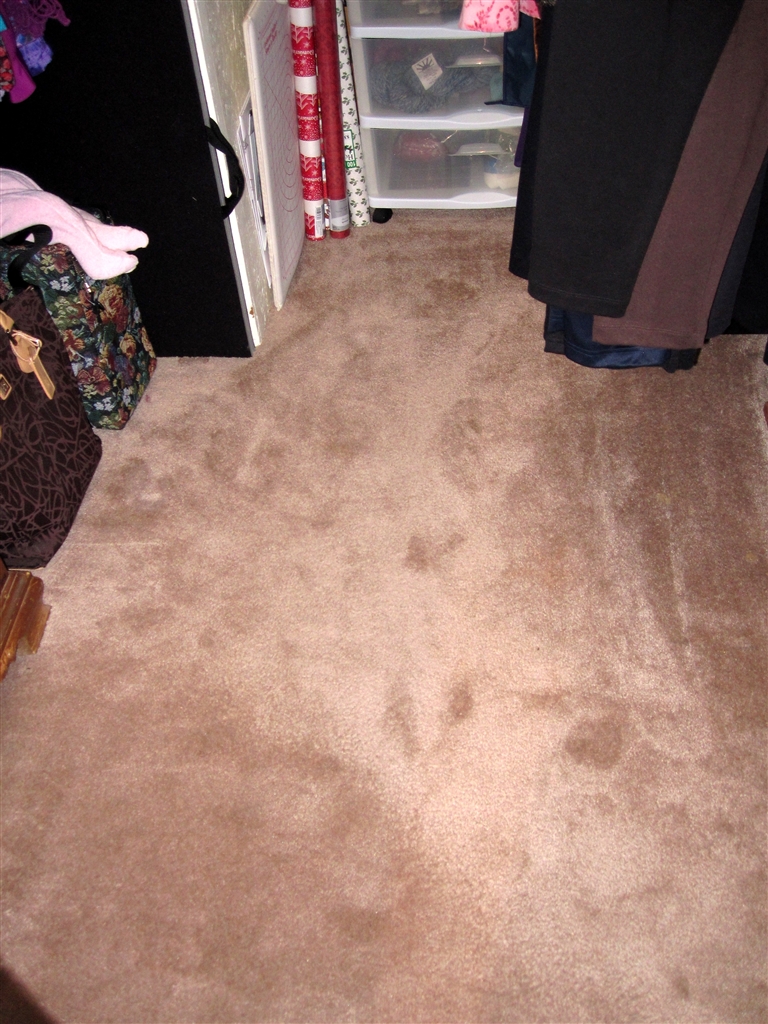
Look at that!  It's the carpet.  You can actually see bare carpet with nothing scattered all over it.  Wow!  I WILL confess, however, that I did have to put a few Christmas presents back in there to hide them from curious eyes next week when the family arrives for Thanksgiving.  It's a big joke in our family that EVERYONE knows where Mom's hiding place is for Christmas presents but hey, if they look, they lose the fun of being surprised.  Besides, it has a nice sliding door that I can conveniently shut.

Just when I was finishing up, I heard a truck pull up outside.  I looked out the window and yippee-ki-yay!  It was UPS.  My Kindle Fire had arrived.  Guess you know what I was doing this afternoon.  I'll give you my first impressions in my next post.


Saturday, November 12, 2011

Feeling the Vibes


Did you survive 11-11-11?  Apparently, it was supposed to be quite an auspicious date.  Of course, most of us were probably aware that it was Veterans Day here in the States.  That happens every 11-11, whether it is 2011 or not.   I did a little digging though, and discovered some of the other "buzz" around the date.


The date happens only once every 100 years.  Chances are that you won't experience another 11-11-11 unless health care REALLY improves between now and 2111.  Quite a few cultures and groups considered the date to be very lucky.  The Hindus think it is quite lucky since the number "1" symbolizes the sun.  I guess because the sun is considered "life-giving", then you can pack a lot of life in 11-11-11.

Speaking of packing life in the date, apparently obstetricians were gearing up for a very long day.  Many expectant mothers were scheduling Caesarians for the 11th.  One doctor even offered to refund his fees for any baby that he delivered that day.  I believe I read that he was going to hold the funds in trust for the kids until their 21st birthdays, though, so let's hope he is still around then.

Lots of folks were getting married yesterday.  The date is considered a great one for new beginnings.  I suspect one ulterior motive might have been that it is a hard date to forget, making it less likely that you'd forget your anniversary.


Quite a few folks of a more "pagan" slant were expecting a bunch of mystical creatures known as the "Spirit Guardians" to show up around mid-morning yesterday.  These creatures supposedly watch over us mortals. They also supposedly prompt you to look at the clock at 11:11 as a way to get your attention throughout the year and do things like make streetlights go off when you go by.  This is supposed to let you know that something big is coming.  I'm not sure why they were supposed to actually show up yesterday.  Maybe it was to whack us on the back of the head, like Jethro Gibbs on NCIS, for those of us a little slow on the uptake.

I read one 11-11-11 website that was predicting three possible scenerios:
Something good was going to happen, something bad was going to happen, or nothing was going to happen.  Gee, I think that about covers it all, don't you?

I read that Egypt closed the pyramids to tourists yesterday so that no weird groups would show up and perform pagan sacrifices on them.  All I can say is, "Thank God!"


So did you have any unusual experiences yesterday?  See any Spirit Guardians?  I didn't notice any over here but I DID get an "aura" mid-morning.  I suppose it could have been related to the date, but I'm more prone to think it was the usual visual manifestation of the migraines that I'm prone to having.  For the rest of you who had "nothing", hang in there.  It's less than 200 years now until your next chance to feel the vibe.


Wednesday, November 09, 2011

Now, Which One Was That?

"I HATE the way they have those windows set up at McDonalds, " I told my husband.

He looked up from the Solitaire game he was playing on the iPad and said, "Huh?"

"I mean, how confusing can they be," I complained.  "You place your order at the drive-up speaker and then they tell you to proceed to the first window."

"So what's the problem?" he asked.

"Well, what's the first window?" I replied.  "Technically, they have you stopping to pay at the second window."

He looked at me like I was nuts.  "No, they don't," he said, slowly and clearly like he was speaking to a two-year-old.  "You pay at the first window.  It's simple."

"But actually that's the second window because you pick up your food at the first window.  The first window is at the head of the line and the second window is behind it," I explained.  "If they really wanted to be clear, they'd say 'Proceed to the first window you come to' and then there would be no confusion."

My husband shook his head.  "You're the only one who thinks like this," he said.

"Think about it," I countered.  "If you wanted to be first for something, would you want to be at the beginning of the line or at the end of the line?"

"At the beginning of the line, of course," he answered.

"So if you're in a line of cars pulling up to two windows, the first window you come to is actually the second window along the wall because the first window is the one after it, at the head of the line.You've got a whole line of cars who have to get past the intermediate window in order to get to the 'prize' window (the FIRST window) to get their food, right?" I told him.

He stared at me.  "I swear I don't know how your mind works.  Nobody else comes up with this stuff," he said.

Today I stopped at McDonalds to get a cup of their specialty coffee.  I drove through the drive-in area, placed my order, and the clerk told me to drive up to the first window.

"OK, I can do this," I thought.  "I'll stop at the second window and get it right this time."
I drove up to the window but no one was standing there.  "Aha," I thought.  "They finally got it right."
I started to drive up to the next window but some frantic motioning from the other window stopped me.  A clerk was leaning out the window, beckoning me to come back to pay.

So I put the car in reverse, backed up and gave her my money.  I toyed with the idea of going inside and telling the manager how they needed to change their instructions OR change the signage on their windows but I was too embarrassed to take the time.  I had forgotten that I still had the car in reverse when I gave it the gas to continue on to the FIRST window to get my coffee and nearly gave the guy behind me (and myself) a heart attack.


Sunday, November 06, 2011

Siri, I Think I Love You!


Now that I have my new iPhone 4s, I have acquired my own personal assistant.  Yes, the new iPhone comes with Siri.  I can't give you all the technical mumbo-jumbo as to what Siri is but I CAN tell you in layman's terms that she (and I use the humanizing pronoun deliberately) is an artificial intelligence-type of  program built into the new iPhone.  You speak to her just like you would to a normal person and she answers you.

For example, to get the screen above, I pushed my home button and said, "Siri!"

She replied, "Yes, Dee?"

I said, "Do you think it is going to snow this week?"

You can see her answer on my phone's screen.  Siri will do things like read incoming texts to you, write a text and send it for you, call people for you, set up reminders for you, pop up a map to show you how to get to a place you ask directions to, and even make recommendations for things like a good Indian restaurant.

That's only the tip of the iceberg.  There's more she'll do.  You can read all about Siri on Apple's website here.  What I particularly like is that there was no tedious learning curve to use Siri.  She was quite agreeable right from the start.  I can remember the old PDA days when you had to "train" your device to recognize your voice and then train it to recognize your handwriting.  Boy, have we come a long way, Baby!

Apple says that Siri will be able to do more and more amazing things as the months go by and more people use it.  Now if this was a sci-fi movie, you might be getting a little twinge of foreshadowing right about now.  Could Siri one day become too smart for her own good.....or for OUR own good?  Ah, who knows?  In the meantime, I'm going to enjoy having someone (or something) at my beck and call who does what I want when I want them to do it.  Besides, I'm notoriously bad at typing on these little phone keyboards and it's incredibly nice to be able to just say a message and have it show up in email or text format.

Siri is also funny.  I asked her if the iPhone was the best smartphone.  Her response?

"You're kidding, right?"

Friday, November 04, 2011

A Novel Use?


When my iPhone 4S was on order, I blogged about my search for the right case/cover for it.  The result was the BookBook case shown above.  It seemed perfect for someone who loved reading as much as I do.  But then I got my iPhone and started using the case.  Alas, it wasn't as perfect as I had hoped.  The size and weight was great, it felt just right in my hand, and the protection it offered my phone was wonderful.

The drawbacks were several major ones that I just couldn't get around.  The main drawback was the fact that there was no cut-out for the rear-camera.  Whenever I wanted to take a picture, I had to undo the tab at the top (cleverly disguised to look like a bookmark) and push the phone up partially from the bottom of the case until it cleared the holder enough for the camera lens to be usable.  The second drawback was when I wanted to talk on the phone, I had to fold the cover back onto itself and hold it that way while I talked.  It felt stiff and awkward.   The BookBook case also was advertised as being usable as a wallet/credit card carrier.  I knew from reading reviews that it wouldn't hold many cards.  But if I put three cards in there, it was very difficult to push out the one in the clear vinyl.  I guess the thought was that you could just keep an ID there and flash it at folks who ask for an ID instead of having to take it out all the time.  Also, if I put several bills in the wallet part, I could barely pry the credit cards out because it made things so tight.  In all fairness, it would probably loosen up over time since it is made of leather.


So I did some more research and finally settled on a colorful CaseCrown Glider case for my iPhone and I'm quite pleased with it.   I love the color, it feels wonderful, and I can easily put it in my special FM transmitter device that I use to listen to podcasts and music through my car's stereo.  That left me with the BookBook case.  Should I try to sell it?  I REALLY liked its uniqueness and the feel of it.  What to do?


I decided to adapt it to hold my miscellaneous credit cards, ID cards, and store cards. I have so many of these darn things that they don't all fit in my regular wallet, which I reserve for the really important cards like my driver's license, military ID, debit card, bookstore card, and insurance cards.  I WAS using a separate wallet for the other cards but it was bulky and took up space in my purse.  Looking at the little BookBook, I decided it would be perfect for these auxiliary cards.


I took the little "dummy iphone box" that had come with the case, cut off the top end, reinforced the sides with packing tape, and voila!  I now had a perfect little container to hold my extra cards.  In they went.  The velcro tab that was designed to hold the phone in place works perfectly to keep the cards from sliding out. I can also put several cards that I use more frequently on the other side of the case in the card slots.

My new system has been working great.  It's perfect for its new use.  In keeping with the literary theme of the case, "All's well that ends well."

Thursday, November 03, 2011

A New Look


If you're a regular reader of this blog, you're probably rechecking your link and wondering what in the world happened to Hot-Flashed Funk.  Well, don't worry.  You've arrived at the right blog.  We just have a new look.....a more modern look.  I blame it on my email.  You see, I opened up my email today and there was the November update from Blogger highlighting the new templates they were featuring.  These templates are more in keeping with the trends these days in electronic magazines and blogging.

I couldn't resist.  As my son frequently tells me, "You LOVE change, Mom!."  He's right.  I love to shake things up and try new things.  I also have been enjoying reading blogs and news on my iPad via Flipboard, Blogshelf, and Zite which use formats similar to the new Blogger templates.

So....to read one of my posts, just click on the post and you'll see the expanded post.  To see other posts, just scroll down and click on whatever strikes your fancy.  If you are wondering where the links on the side went to, look up in the blue bar across the top of this blog where it says "Pages."  Click on that down arrow and you'll see that I've made a separate page for each of the different link categories.  If you see something you want to share with the world, the new template makes it easy to share the link now on Twitter or Facebook.

In the next few weeks, Blogger has promised to roll out more gadgets in support of these new templates so maybe I can get back to including a pic of my latest knitting project or my tweets or random books from my library.  But if not, I'll just have to blog about projects as I finish them and you can always head over to Twitter to follow me.  I don't Tweet a lot so you won't be inundated. You'll find me over there as "Booklassie."  And I must say...looking at the picture above, I never noticed before now that my monitor that's hooked up to my laptop when I'm working at home is askew.  I guess that would explain my view of life.  Have a great day today, kids!

Wednesday, November 02, 2011

The Facetime Horror Show

My new iPhone 4s arrived Monday and I've been having fun setting it up, getting things transferred over from my old iPhone 3 and trying out the new features.  Let me just say right now that I LOVE Siri.  FINALLY I have somebody I can boss around who actually will listen to me, even if she IS an artifical intelligence "person."

After I finished my phone activation, I decided to take my iPhone out for a "test run", so to speak.  I called my brother.

"Hey, John,  I'm calling you from my new iPhone," I gloated.

"Cool," he replied.  "Hey, doesn't it have Facetime?  We could try using that."

"OK, hang on, " I said, as I searched the call screen for the icon, "Let me switch over to it."

Sure enough, up popped my face in a little window and the phone indicated that it was trying to connect to my brother but no picture was coming up.  We fiddled around with our phones, talking all the while on them, trying to figure out what we were doing wrong.

"Hey, remember that YouTube video I sent you of that old couple trying to figure out how to use their computer's webcam?" I asked him.  He laughed.  "I sure hope these phones aren't recording us."

"Oh, maybe I have to click on the 'Accept' button," he said.  Up popped his face.


"Jeez," I said.  "Where ARE you?"

"I'm in my computer room but it's pretty dark in here," he answered.

"I'll say," I laughed.  "All I can see is a floating head.  You look like that host of the old Saturday afternoon horror show we used to watch on TV when we were kids."

"Maybe this will help," he said, as he reached up to turn on a light he had hooked to his computer monitor.

"Aargh, turn it off," I chuckled.  His receding hairline made the glare on his forehead blinding.


"Sheesh, I can see you but I can barely see me on this phone.  I'm in this little box up in the corner, " I said, as I  took off my glasses and leaned closer to get a better look.  "Holy s___! Is that what I look like?  Look at the bags under those eyes!  I could fit a whole sale at Macy's in those."


We spent the next 5 minutes amusing ourselves making faces at each other via Facetime.  Ain't technology grand?

"Hey, what's this little camera icon down here in the corner?  Maybe I can take a picture of you on the screen like I can when I'm Skyping," I mused aloud.  I pressed the icon.  Suddenly I was looking at my tablecloth.

"Whoops, that must activate the camera on the back of the phone," I told John.

"Hey, neat," he said.  "Do you still have snow there?  You could show me."

We spent the next 5 minutes aiming our phones at different views in our houses.

Our fun was interrupted when he had to cut the conversation short to leave for an appointment.  Gee, and we were having so much fun.  Just think of all the great moments of sister-brother bonding we've been missing without Facetime.  Until next time......